
Normal CPU Temperature: Safe Ranges for Idle, Gaming, and Heavy Load (2026)


On this page
A normal CPU temperature is roughly 30–45°C (86–113°F) when your computer is idle, and about 60–85°C (140–185°F) while you are gaming or pushing it hard. Once a CPU sits above 90–95°C under load for long stretches, that is when you should start paying attention. That is the short answer. The longer one is worth a few minutes, because what counts as “normal” shifts depending on which processor you own and what you are doing with it.
I have built and fixed enough machines to say this plainly: temperature panic is one of the most common mistakes people make. A number that looks alarming on a monitoring app is very often completely fine. So let us set some honest baselines first.
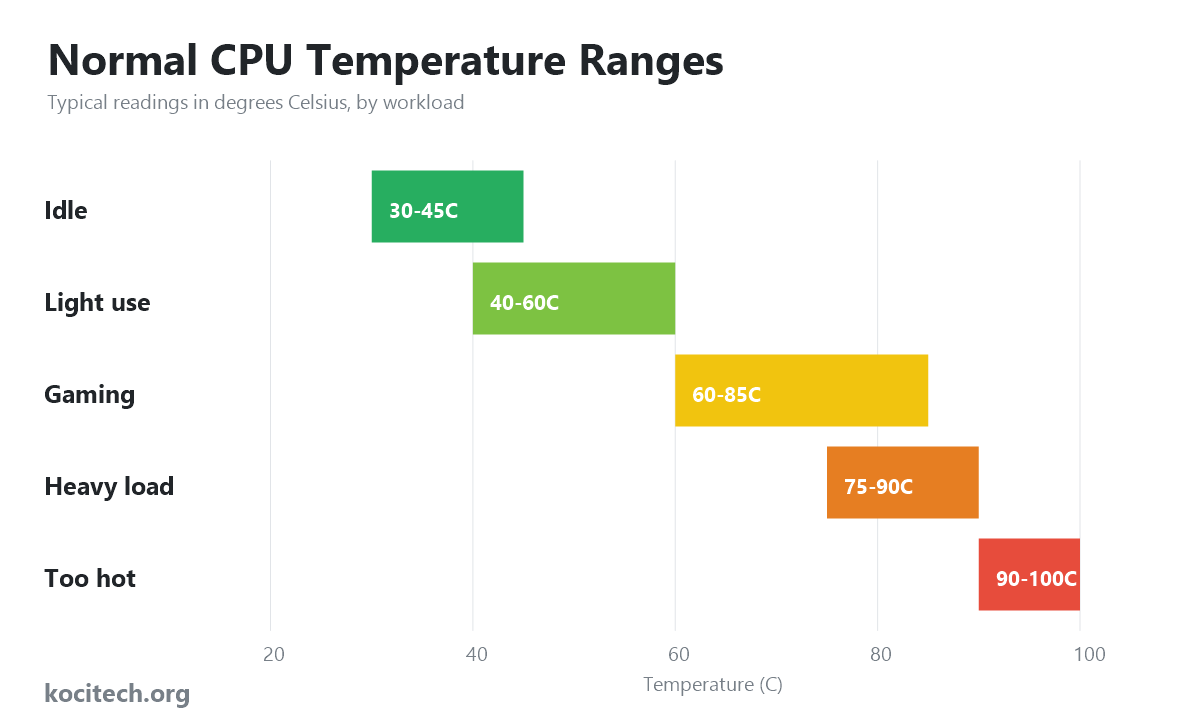
Quick reference: normal CPU temperature by workload
| State | Temperature (°C) | Temperature (°F) | Verdict |
|---|---|---|---|
| Idle / desktop | 30–45°C | 86–113°F | Ideal |
| Light use (browsing, video) | 40–60°C | 104–140°F | Normal |
| Gaming | 60–85°C | 140–185°F | Normal |
| Heavy load (rendering, stress test) | 75–90°C | 167–194°F | Acceptable |
| 90–100°C sustained | 90–100°C | 194–212°F | Too hot – act |
What is a normal idle CPU temperature?
At idle, your processor should settle somewhere between 30°C and 45°C. My main desktop hovers around 38°C sitting on the Windows desktop, and that is with a fairly average air cooler in a room that is neither hot nor cold.
Three things move that number around: the temperature of the room your PC lives in, the cooler you are using, and how much air your case actually moves. A machine in a warm room in summer can idle 5–10 degrees higher and still be perfectly healthy. Laptops are a different animal entirely – cramped cases and small heatsinks mean 45–60°C at idle is normal for them, not a warning sign.
Normal CPU temperatures while gaming
Gaming is where most people first notice their temps climbing, and where most of the needless worry happens. A range of 60–85°C during a gaming session is normal and safe for the vast majority of modern processors. Brief spikes to 80–85°C when a new area loads or a fight kicks off are nothing to lose sleep over.
Here is the part that surprises people: recent chips are designed to run hot. Intel 13th and 14th Gen processors and AMD’s Ryzen 7000 series will happily push toward 90–95°C under load as part of their normal boost behaviour. They are not broken – they are squeezing out every last bit of performance until they hit a thermal ceiling. If you want to understand how chip choice affects this, our breakdown of whether the 7800X3D is the ultimate gaming CPU is a good companion read, since X3D chips run noticeably cooler than most.
One related question worth clearing up: yes, streaming while you game does heat up the CPU, sometimes considerably, because encoding the video is extra work piled on top of the game itself.
Normal temps under heavy, sustained load
Video rendering, code compilation, 3D work, and stress tests like Cinebench or Prime95 push a CPU harder than almost any game. Under that kind of sustained, all-core load, 75–90°C is acceptable. The key word is sustained: a chip that touches 88°C for a few seconds is fine, while one that lives at 95°C for an hour-long render is telling you the cooling cannot quite keep up.
How hot is too hot? The real danger zone
Almost every modern desktop CPU has a maximum rated temperature – called Tjmax – of around 95–100°C. When it reaches that point, the processor protects itself by throttling: it deliberately slows down to shed heat. Cross it anyway and the system will simply shut off to avoid damage.
So the honest danger line is not a single magic number, it is a pattern. Hitting 95°C for a moment will not hurt your chip. Living at 95–100°C every single day for months will shorten its life and, more immediately, rob you of performance through constant throttling. If your CPU consistently slams into the high 90s during normal gaming, your cooling is undersized for the job.
Signs your CPU is running too hot
- Fans spinning loud and fast even during light tasks
- Stutters, frame drops, or sudden slowdowns mid-game (classic throttling)
- Random restarts or shutdowns under load
- The case, or a laptop’s underside, becoming uncomfortably hot to touch
Laptops show these symptoms first because they have so little room to breathe. If you are on a Mac and seeing this, our guide on fixing an overheated CPU on a MacBook walks through the specific fixes.

How to check your CPU temperature
You cannot fix what you cannot see, so install a monitoring tool. On Windows, the free options I reach for are Core Temp, HWiNFO, and HWMonitor; any of them will show per-core temperatures in real time. AMD owners can use Ryzen Master, Intel owners the Extreme Tuning Utility. On a Mac, apps like Stats or iStat Menus do the job.
For a quick reading without any software, restart and check the temperature shown in your BIOS/UEFI – though bear in mind that figure reflects an idle, freshly booted machine, so it will look low.

How to lower your CPU temperature
- Clear the dust. A heatsink choked with dust is the single most common cause of creeping temperatures. A can of compressed air every few months works wonders.
- Improve airflow. Make sure your case has a sensible intake-and-exhaust setup and that cables are not strangling the airflow.
- Re-apply thermal paste. Paste dries out over two to three years. A fresh application can drop load temps by 5–10°C – just use the right amount, which our guide on how many grams of paste per CPU covers exactly.
- Upgrade the cooler. If you are still on the stock cooler, a solid aftermarket air cooler or an AIO liquid cooler is the biggest single improvement you can make.
- Consider undervolting. Slightly lowering the voltage your CPU draws can cut temperatures meaningfully with little or no performance loss.
Frequently asked questions
Is 80°C safe for a CPU?
Yes. 80°C under gaming or heavy load is well within the safe range for modern processors. It only becomes a concern if the chip is sitting there during light tasks or idle.
Is 90°C too hot while gaming?
Brief spikes to 90°C are fine, and some current Intel and AMD chips are built to reach it. Constant 90°C during every session, however, suggests your cooling needs attention.
What is the maximum safe CPU temperature?
Most modern CPUs are rated to around 95–100°C (Tjmax), at which point they throttle to protect themselves. Staying below 85–90°C under load is the comfortable target.
Do laptops run hotter than desktops?
Yes, noticeably. Their compact design leaves little room for cooling, so idle temps of 45–60°C and load temps in the high 80s or 90s are common and usually normal.
Does a hot CPU mean a slow CPU?
It can. Once a processor hits its thermal limit it throttles – deliberately reducing speed to cool down – which you feel as stutter or lower frame rates. Keeping temperatures in check keeps performance consistent.
Bottom line: cool, quiet, and stable beats chasing the lowest possible number. If your CPU idles in the 30s and 40s and stays under about 85°C when you push it, you have nothing to fix – go enjoy your machine.

Marcus has been building and tuning custom PCs for over a decade, from budget first builds to water-cooled overclocking rigs. He writes about components, cooling, and squeezing the most performance out of every dollar.


